Cases: from signal to case
A case is the unit of work: one qualified event, with its product, its chronology, its attachments and — if an obligation exists — its deadlines. Every case carries an unpredictable identifier of the form CRA-IT-2026-123456, drawn at random: the number does not disclose how many events you have had. A case does not appear on its own from an external event: it comes from a human decision.
Where a case comes from
/signals), not a case. A person reviews it and, if it is pertinent, promotes it to a case: only then does the case exist and awareness get set.Signal ≠ case. Receiving an event starts no legal clock: there is no awareness until you promote. It is promotion — or manual entry — that creates the case and sets the «moment of awareness». The signal lifecycle is detailed in Public form and in the INCOMING queue.
Entering a case by hand
The screen asks for the minimum needed to reconstruct where the information came from:
| Field | What to write |
|---|---|
| Product | The product with digital elements involved, picked from the register. |
| Channel | How it arrived: form, email, internal. |
| Reference | Your own external identifier: ticket number, protocol, CVE identifier if already known. |
| Sender and contact | Who reported it and how to reach them. This is what lets you give the reporter feedback. |
| Subject and text | The report exactly as it arrived. Pasting the original beats summarising it. |
| Attachments | Up to three files (max 5 MB each). Uploaded by an authenticated user, they count as verified. |
Good practice. Paste the full text of the report, email headers included. Reconstructing the «moment of awareness» in an inspection rests on exactly that detail.
Disposing of an inbound signal
A signal arriving from outside does not enter the flow automatically. In the INCOMING queue (/signals) a person reviews it and chooses one disposition:
- Promote — the signal is a real, pertinent event: it creates a case in state new, with the awareness you declare at that moment. The act stays on the record.
- Attach — it concerns a case that already exists: you link it to that case without creating a new one, and the signal's attachments follow.
- Duplicate / Informational / Dismiss — it does not deserve its own case (already known, for information only, or spam or not pertinent): the signal is closed with the justification preserved. It is not deleted: a rejection is also a decision you may need to show.
Disposing of a signal is a security control, not a formality: it keeps untrusted content (and its attachments) out of the evidence file until a person has looked at it, and stops an event from starting the legal clocks with nobody having decided so. See Quarantine and anti-abuse defences.
Case states
| State | Meaning | Next step |
|---|---|---|
| new | Case created (promoted signal or manual entry), to be qualified. | Start the triage. |
| triage | Qualification under way. | Complete the three steps. |
| obligation | Triage found a duty to notify: the clock is running. | Prepare the notification and file. |
| in progress | Early warning filed; update and final report remain. | File the later phases. |
| fulfilled | Final report filed: the path is complete. | Preserve the dossier. |
| archived | No obligation, or a case archived without triage. | None; it stays consultable. |
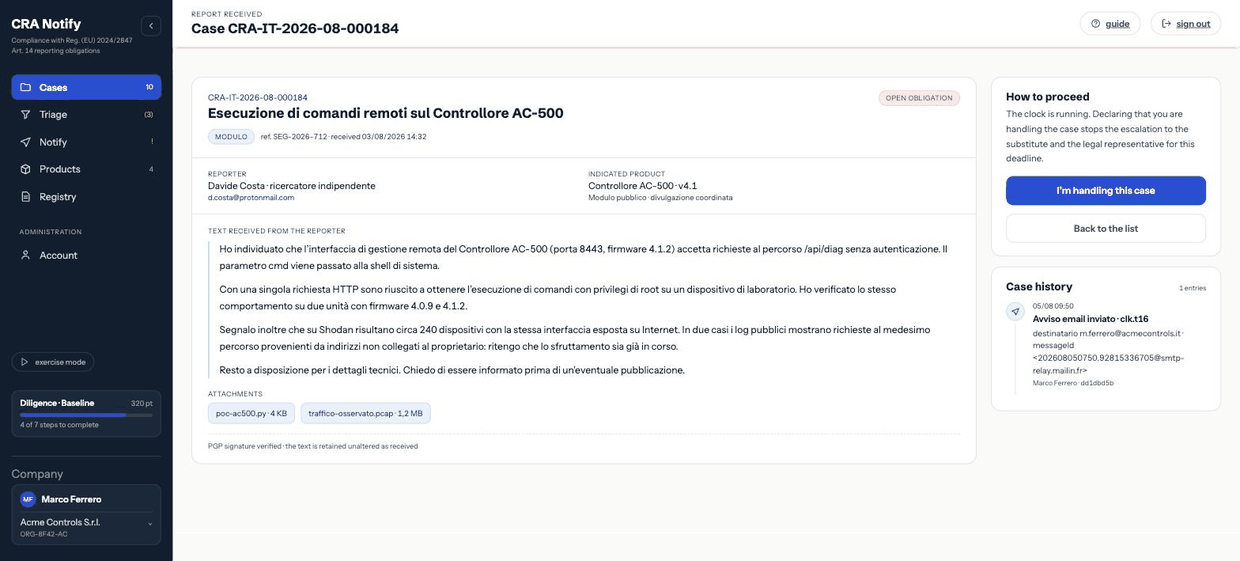
The case screen
The detail gathers on one page: the report as it arrived, the attachments with their verification state, the chronology of actions on the case, the current phase with its deadline, and the available actions. Opening a case also updates its «last opened» marker, which feeds the no-response reminder (see Email: families and recipients).
Taking charge
When a case is in obligation, a Take charge button appears. It declares that the contact is handling it: escalation towards the deputy and the legal representative is suspended for that deadline, and the declaration stays on the record. Use it — it stops counsel receiving alerts about something already in hand.
Archiving without triage
An obviously irrelevant case can be archived without qualification. That too leaves a registry row with its justification: choosing not to assess is itself a decision.
Attachments
Up to three files per case. Attachments uploaded by authenticated users count as verified; those arriving from the public portal stay unverified and are treated as untrusted material: they are only downloaded (never rendered in the page) and are reachable only by users of your organisation.