Guided triage
Triage qualifies the event in three steps. It is not a questionnaire: every answer has a precise effect on the verdict and on the deadline, and stays on the record with the name of whoever gave it. It starts from the case detail with «Start the triage» and continues at /triage-app.
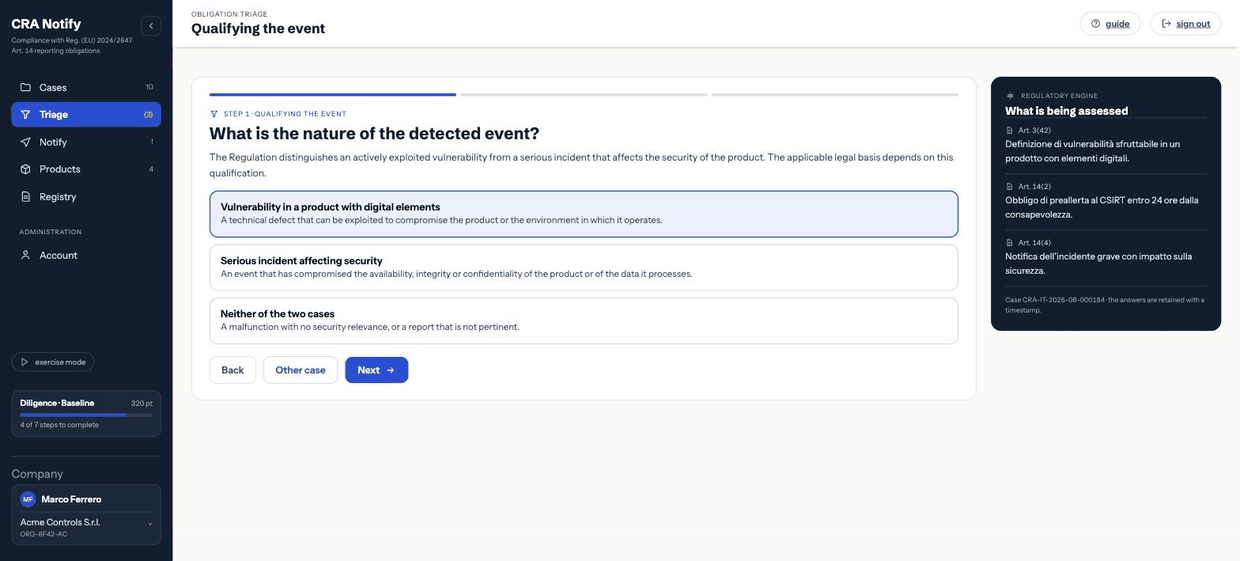
Step 1 · Qualifying the event
What is the nature of the detected event? The Regulation distinguishes an actively exploited vulnerability from a serious incident that affects the security of the product. The applicable legal basis depends on this qualification.
| Option | When to choose it |
|---|---|
| Vulnerability in a product with digital elements | There is a technical defect that can be exploited to compromise the product or the environment in which it operates. |
| Serious incident affecting security | Something has already happened that compromised the availability, integrity or confidentiality of the product or of the data it processes. |
| Neither of the two | A malfunction with no security relevance, or a report that is not pertinent. Leads straight to «no obligation». |
If the event is both a vulnerability and an incident (an exploited flaw that caused an outage), qualify it by what you intend to notify first and note the rest in the description. The two legal bases carry different final-report deadlines: see Phases and deadlines.
Step 2 · The precondition of the obligation
The second question changes depending on the answer to the first.
If you chose «vulnerability»
Is there evidence of active exploitation? A reported vulnerability is not the same as an exploited one: the obligation arises where there are elements attesting to actual use by third parties.
- Yes, documented evidence of actual use — records of unauthorised execution, an exploit in circulation, confirmation from a reliable source.
- No, the vulnerability has only been reported — disclosure by a researcher, no indication of exploitation under way.
- Insufficient elements to decide — the analysis is under way: the assessment is suspended and resumed with a reminder.
If you chose «serious incident»
Did the event affect the product's ability to protect availability, integrity or confidentiality? The obligation arises when the event actually compromised a security property of the product or of the data it processes; a mere anomaly, without impact on security, does not meet the precondition.
- Yes, compromised — service disruption, alteration or unauthorised access confirmed.
- No, no impact on security — a malfunction or disruption without any compromise of the security properties.
- Insufficient elements to decide — assessment suspended with a reminder.
«Insufficient elements» is not an escape hatch: it is the correct answer when you genuinely do not know. It produces a suspended verdict with a re-check reminder, and the suspension itself is documented. Answering «no» to close the file, and later discovering that exploitation was real, is the worst position you can be in.
Step 3 · When the deadline starts
From when did the company become aware of it? The 24-hour deadline runs from the moment of awareness. Give the documentable time: the first receipt of the report or the first internal finding.
From here the clock starts, computing expiry at 24 hours.
Changing the moment of awareness
It can be corrected later, if it emerges that the company knew earlier. The change requires a justification, recomputes the expiry immediately, stays on the record with the old and new values, and generates an alert to the contact and to the legal representative. It is deliberately conspicuous: moving a deadline is an act that must be explainable.
Concluding the triage
After the three steps the engine applies the decision table and produces the verdict. The triage:
- records the start and the conclusion in the registry, with the author;
- appends the verdict to the case's verdict history — the sequence is cumulative: a new assessment does not erase the previous one;
- moves the case into the state matching the outcome;
- sends the outcome (obligation or no obligation) to the contact.
A triage can be repeated as often as needed: when new elements arrive, restart it from the case detail. The verdict sequence will show how the assessment evolved, which is precisely what you need to demonstrate.
What «suspended» means in practice
The case stays under assessment and a re-check reminder is scheduled for the contact. Meanwhile the early-warning clock keeps showing: the suspension concerns your ability to decide, not the running of the statutory deadline.