How the application is laid out
A sidebar on the left, the content in the middle, and — whenever a case is being worked — the deadline clock always in sight. There are few screens and each one matches a step of the flow.
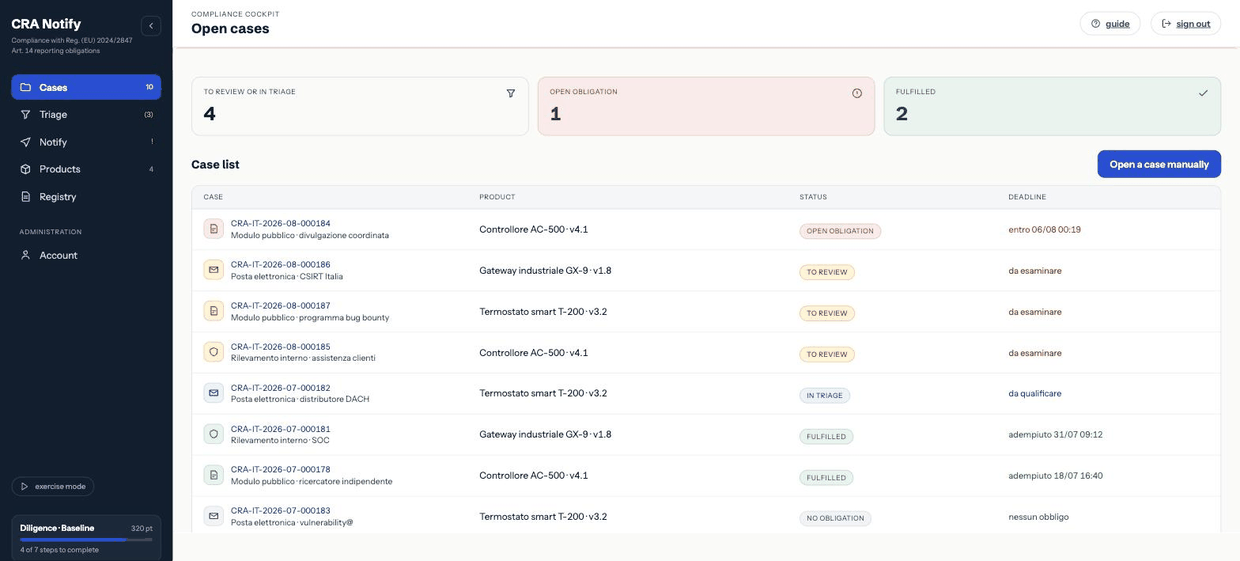
Navigation
| Item | Address | What it is for |
|---|---|---|
| Cases | /casi | The cockpit: every open case with its state and deadline. |
| Triage | /triage-app | The guided qualification of the event, in three steps. |
| Notification | /notifica | The draft of the communication to the authority. |
| Registry | /registro | The activity registry, filterable and exportable. |
| Products | /prodotti | The register of products with digital elements. |
| Account area | /account | Profile, company, subscription, form, API, SBOM, alerts. |
The full address map, with who may open what, is in Address map.
The deadline clock
When a case has a running deadline, the header shows the countdown: time left, moment of awareness, computed expiry and the reference window (24 hours for the early warning). Next to the countdown, a label with an icon states the deadline status: colour supports it, never replaces it:
The countdown ticks in the browser but is anchored to the expiry computed by the server: reloading the page or changing time zone does not move it. The full behaviour is in Phases and deadlines.
The setup checklist
The sidebar carries a card with a level (Baseline, Managed, Solid, Exemplary) and seven steps. It is not a game: these are the seven behaviours that, taken together, evidence a diligent handling of the obligations.
| Step | Counts as done when… |
|---|---|
| First triage | at least one case has been qualified with a recorded outcome. |
| Filed on time | an early warning was filed before its deadline. |
| Users notified | the notice to affected users (Art. 14(8)) was issued and recorded. |
| Upstream chain | a third-party component was reported to its maintainer (Art. 13(6)). |
| SBOM connected | at least two SBOM tools are active. |
| Complete register | at least four products are registered with identifiers. |
| Ready to file | products, roles, reporting alias and prerequisites are configured. |
A step covered by procedures outside CRAnotify can be marked done manually: the indicator measures your organisation, not your use of the software.
The subscription band
A band may appear above the content with the subscription state: trial days left, grace period, or read-only. In grace and read-only, writing is blocked, while reading, the registry and exports stay available — the registry is evidence, not a metered service. See Subscription and billing.
Language and accessibility
The interface is available in Italian and English; the switch is in the public site header and the choice is remembered. The application is keyboard-operable, focus is always visible, contrast meets AA and the layout holds down to 380 pixels wide. The full statement is at https://cranotify.eu/accessibilita.
The exercise marker
With exercise mode on, the header says so and every registry entry produced is marked [esercitazione]. It is how a rehearsal is never mistaken for a real filing.