Activity registry
The registry is the organisation's book of acts: every decision, communication and relevant setting leaves a row with its moment, author and references. It is the core of the defence: before an authority, what counts is being able to show what was done and when — not remembering it.
What is recorded
| Type | Example events |
|---|---|
| report | Report received from the public portal, case entered manually. |
| assessment | Triage started and concluded, verdict, acceptance or rejection of a report, taking charge, archiving, change of the moment of awareness. |
| notification | Filing of the early warning, update and final report; user notice; report to the maintainer; dispatch of operational alerts. |
| administration | Changes to company data, users, escalation, API keys, SBOM integrations, alert channels, public form, account security. |
Each row carries: a short identifier, the moment, the type, the case it refers to, the author, the description of the event, and references (legal basis, receipt name, recipients…).
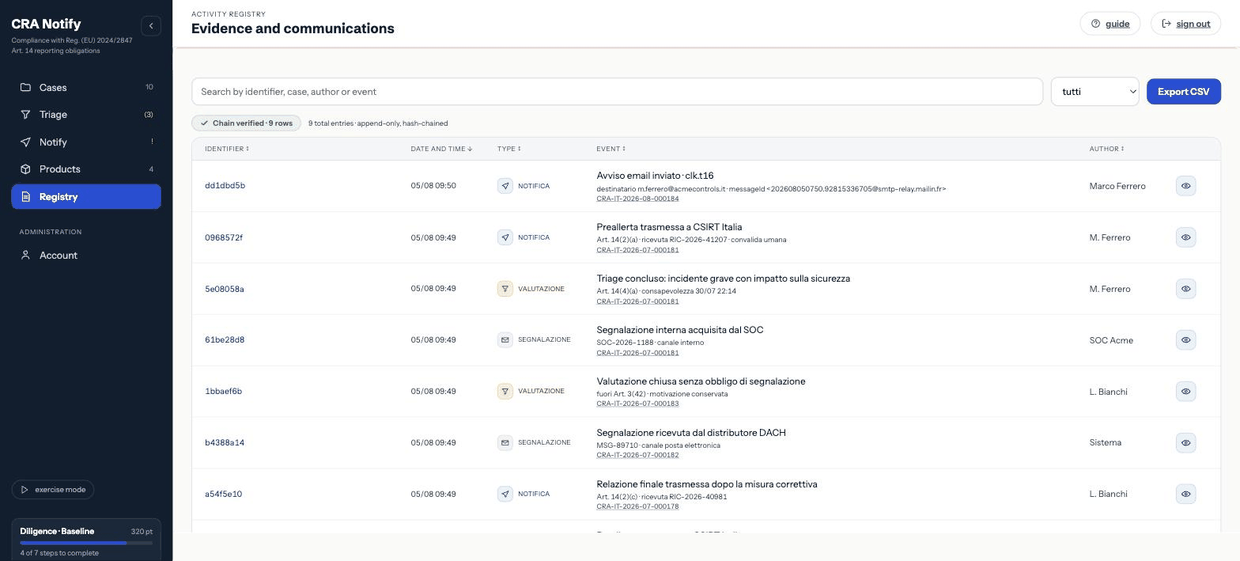
Browsing and filtering
- Filter by type — all, report, assessment, notification.
- Text search — across description, references and case number.
- Sorting — by date, identifier, type, event or author, ascending or descending.
From a case detail you see only that case's chronology, which is often the most useful view while working.
Exporting to CSV
The export button produces a CSV that respects the active filters. The columns are:
id, timestamp, tipo, caso, autore, evento, riferimenti, hash, prev_hashThe file is UTF-8 with a byte-order mark, so it opens correctly in Excel too. The last two columns are the digests of the integrity chain: they are what lets a third party verify the export without access to the system.
Good practice. Export the registry whenever a case closes and archive it where you keep contractual evidence. The export is always available, even if the subscription has lapsed or is read-only.
Why alterations are detectable
Rows are appended, never corrected or removed. If an assessment was wrong, record a new one: the sequence will show the error and the correction, which is precisely what evidences active management. A registry that can be rewritten afterwards would prove nothing — and the hash chain makes any tampering immediately visible.
Exercise entries
With exercise mode on, every row produced is prefixed with [esercitazione]. They stay in the registry (a rehearsal is itself evidence of diligence) but are never confused with real filings.
The author of a row
The author is the user who performed the act. Rows generated by the system — a scheduled reminder, for instance — carry their automatic origin. If a row shows a dash, the action happened without an identifiable user (typically a scheduler): normal for alerts, not normal for a filing.
Retention
The registry is kept for the whole retention period of the dossier and is not deleted by a personal-data deletion request: it is documentation of regulatory compliance. Details in Personal data and retention.